Wednesday, 24 June 2026

Testing

 I am now in the phase of testing my prototype.


We had a second day at KPMG where we had wonderful manaakitanga. A big thank you to Justine who hosted us as well as asked probing questions about our projects.

 A beautiful day in the CBD of Auckland. I was so enjoying the sun and views over the harbour I didn't take any photos.

We presented our projects in a Shark Tank environment. In five minutes we explained the problem, the tool, the user, and the value. It was a great experience and helped me to see the next steps and where I needed to sharpen up my presentation skills. The questions from others helped me. 


Thursday, 19 March 2026

Prototype

 Here is my prototype to support orientation of new staff in schools. 

My hypothesis is that teachers and leaders will use NotebookLM to interrogate the data sources. 


Friday, 13 March 2026

Kick Start Hui

 Our MIT kick start hui was a great introduction, to the people, the process and a beautiful place. We learnt lots, we had fun. 

Saturday, 7 March 2026

Moonshot

 I have started the Manaiakalani Innovators Teachers programme in 2026. 

These slides are my Moonshot ideas, the very first step.


Thursday, 2 October 2025

Film Festival Done Differently

As a hybrid cluster of schools across Aotearoa New Zealand, we decided that this was the year to curate our own online film festival. We have been part of the Manaiakalani Cluster for the last three years. We submitted films and attended the event planned by them to celebrate the creativity of learners across their cluster. We added our movies to their cluster site and learned alongside.

Beginnings

When we first started in 2022, films were heavily supported by facilitators as teachers mostly lacked experience. Over time, teachers gained skills and confidence. Four years later, we have teachers across a range of schools with growing skills in filmmaking.


2025 Online Film Festival

We took as our theme for the film festival, our cluster whakatauki:

Poipoia te kākano kia puawai | Nurture the seed and it will blossom

The idea of nurturing the talents and creativity of teachers and learners seemed appropriate. The aim was to give people scope to be creative while also highlighting our purpose as a cluster.

Tuesday, 1 July 2025

Tell your Story through Images

Learning to Tell Stories Through Images

As a part of the Manaiakalani Online Toolkits, I recently had the opportunity to lead a toolkit focused on creating short films by telling a story through images. It was a journey that completely changed my perspective on filmmaking.

Before this, my understanding of filmmaking was primarily technical—I knew about camera shots and storyboarding, but I honestly found it all a bit dry. It felt like a necessary but unexciting part of the process.

However, after diving into the research for this toolkit, I’ve had a massive shift in thinking. I now understand why these technical elements are so crucial, and I'm genuinely excited about them.

Wednesday, 15 January 2025

Better Conversations

Practicing the habit of an inquiring mindset. "Why is this person talking/acting this way?" "What is underlying?" Knowing the background changes the way we act.

  1. Empathy - having empathy towards ourselves. What is happening inside my brain? e.g. fear, judgement,... How am I feeling? I might need to clear my brain to be open to the other person. Put aside my own feelings. #itstartswithus

  2. Cognitive Empathy - What does this person need right now?

  3. Affective Empathy - How are they feeling?


These are some thoughts from Better Conversations by Jim Knight

Communication strategy

The most important thing is that I genuinely want to hear what they have to say.

Interviewing as Qualitative Research

A Guide for Researchers in Education and the Social Sciences

Author: Irving Seidman

A strategy from this book

Public voice - for others' consumption

Private Voice - what is really going on

I can listen carefully for the private voice. I can be curious as to what is underneath.

Instructional Coaching


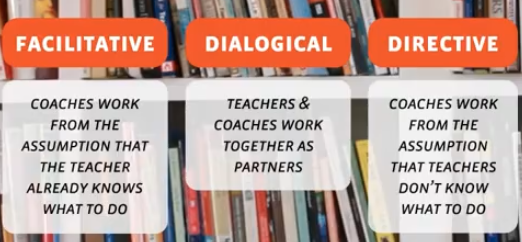
Facilitative Coaching -  A sounding board. The teacher already knows what they need to do. Through the questioning process, the teacher recognises what to do and sets goals

Directive Coaching - An expert with an apprentice. The teacher does not know the practice. The coach needs to describe the practice and ensure that the teacher is doing the practice.

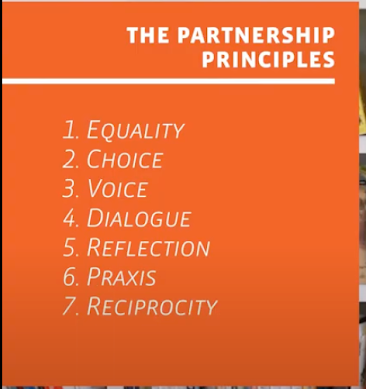
Dialogical Coaching -  Don’t give advice as an expert, but position the teacher as a partner. Honour the autonomy of the teacher. The coach does not push their own perspective, but is not silent either.


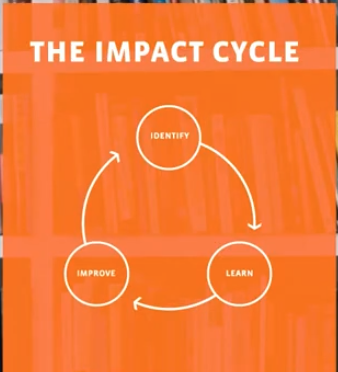
Identify a clear picture of the current reality, using evidence from the learner. The teacher, as the learner, indicates how close the reality was to the plan on a scale of 1- 10. The teacher then sets a PEERS goal: Powerful, Easy to achieve, Emotionally compelling, Reachable, Student-focused.


Model it as the coach. See it before we do it

Implement - Teacher does it

Modify (modify goal, strategy, etc)


https://www.instructionalcoaching.com/research/

Further Reading

https://www.amazon.com/Focus-Teaching-Using-High-Impact-Instruction/dp/1483344126


Wednesday, 25 September 2024

Film Festival


I have been working with teachers to support them in creating films for the Manaiakalani Film Festival.

Many have worked independently and have only needed a few prompts to get over the line.

I created this resource based on the work of Naomi Toland and using resources from the Manaiakalani teacher resources.


In August I led a Toolkit entitled Movie-making - Tools, Tips and Teacher Strategies. 14 teachers attended this and we walked through the process of taking a story idea to a visual portrayal and then a storyboard. 


I have supported one teacher step by step. Firstly in teaching her and her learners to create a film using WeVideo. From there she was keen to sign up for the Film Festival and openly said, "I will need lots of help".

We worked together on each part of the process. I am so proud of her giving it a go and what she has created with her learners. 

I have dived into the details and learnt more about storyboarding. I have underrated this important step in the past and now I would spend more time planning and getting feedback from others before diving into filming. This quote from Paerangi | Video 2 | What Makes a Good Story?  really resonated with me:

“...can you tell your story through images?.... so wherever possible 'show' rather than 'tell' and think about images carrying as much of the story, if not more, than dialogue.”


It is exciting to be part of the Film Festival and while I have cheered on and supported before, this is the first time I have walked the whole process from whoa to go. 


The Manaiakalani Film Festival will be shown on 13 November at Sylvia Park. At the same time, teachers will release their films on their class blogs for comments.

I'm so looking forward to all those learners seeing themselves on the big screen. For some, it will be their first time in a movie theatre!

Friday, 20 September 2024

Learning to Share

 Teachers are keen to share their learning.


In response, I led a refresher on blogging on Edublogs in their school.

The focus was on how to do things technically. Most already knew about the why of sharing learning and just needed reminding on the how or some support to get new learner edublogs.

We practised by creating and publishing blog posts on class blogs.
Here are some to take a look at. They would love a comment!


Some teachers are new to sharing on blogs. I think they sharing some great learning.

We finished with a wero or challenge:


I'm looking forward to where the sharing learning via Edublogs will take these teachers and their tamariki (children).

Friday, 22 September 2023

Same or Different

As part of our Professional Learning Group on Oneline Facilitation, we presented to our fellow facilitators about what we do. 

Our aim was to inform about what we do, our inquiry and to hear back from others about what we might do differently.


We gathered feedback from other facilitators to see what they undestood about the differences and similarites of face-to-face comapted to online facilitation.

N.B. The Jamboard has been converted to Figjam to keep as a record.

We will continue the inquiry.

Friday, 15 September 2023

Teaching the Teachers

 Once again, I am reflecting on my teaching online.

The recording is with adults. Teachers have chosen to be part of an Online Toolkit. This is one of the many termly offerings in the Manaiakalani Toolkits Online.

I recorded the video from within the Google Meet.


What I Notice

0:48 The recording does not show the chat! 2:18 I use time-fillers quite a lot, e.g. Umm... Ummm... 2:33 I am looking at a second screen. 5:46 Am I frozen? Checking in - can participants see or hear what they need? I was frozen henceforth! (Never had this before) 6:30 People are quiet - does that mean they are following and understanding? Perhaps I should be checking in more. I can see people on the screen although they do not show in the recording. 35:24 Good to hear people giving verbal feedback. Wait time is useful.


The content has been shared with people before we begin. It is rewindable so people can access it anytime and as many times as they need. 


Next Steps

People not being able to see me may have been a barrier to learning. I think for the future if this happens I should stop and try to fix it by stopping presenting my screen or logging off the video call and joining again.

A difference between working with adults and learners is that I rely on adults speaking up if there are questions or issues. When working with learners, having Hāpara Highlights means I can see what they are doing on their screen and can pick up issues early.

Perhaps giving adults other ways to show their understanding could be valuable. A jamboard to share a screenshot of the reader they created. A poll with pre-prepared questions for them to respond to would be another quick way to capture understanding. This could be done anonymously so as to get an overall picture.

Makes me think... Prepare, prepare, prepare.

Preparation is the key.


Thursday, 17 August 2023

What Next with Online Facilitation?

This is a year 4 class where all students have their own Chromebooks. We use Google Meet for our online interactions. The teacher shares the Google Meet session on a large screen in the classroom.

I've included the complete lesson as recorded on Google Meet. This unedited recording provides an authentic experience, showing both successes and challenges. You'll notice instances where I make mistakes, there's a classroom announcement over the speaker, and we even spend some time discussing blog administration.

Initial Thoughts

I've realized that I tend to speak quite loudly, almost using my "teacher's voice," even though we're in a virtual environment on Meet.


Key Observations

1:00 We review and discuss the work students completed in the previous week. 4:30 Team teaching with the class teacher revisit past learning 5:10 I demonstrate concepts on the screen while the class teacher provides explanations. 9:03 Showing current screens on Hāpara Highlights 11:50 Chromebook screens are 'sharked' (half-closed) and learners are focused on the big screen 18:05 Exploring individual student work through Hāpara Highlights. 27:22 Teaching how to crop an image 44:24 I appreciate how the class teacher co-teaches by setting guidelines. 44:56 Some time spent on blog administration. 54:01 I teach the teacher but forget to share my screen!

What's Up Next

The teacher's proactive and enthusiastic approach is worth noting. How might I inspire other teachers to match this level of engagement during online facilitation?

During the blog administration discussion, most students remain on track. It's important to recognize that the length of these discussions might vary in different classrooms. In some cases, discussions might need to continue outside of the Google Meet session.

As is often the case, making mistakes during live modelling provides valuable learning opportunities. It's encouraging to see these moments put to good use.

Considering the students' level, I've realized that I tend to focus primarily on modelling the learning process. To enhance the experience, I could also provide rewindable resources like videos for students to refer back to during independent learning.

Additional Considerations

What aspects might I have overlooked? I'm open to suggestions on how I can improve my teaching methods. Is there anything you believe I should approach differently?


Friday, 23 June 2023

What works and what doesn't

I have recorded some online facilitation lessons and am reflecting on what works well and what doesn't.

It is always hard to watch yourself teaching and not cringe. I am finally doing it! Watching and ....

I notice that I say, “Alright!” quite a lot! Along with, "Alright, now..."

The recording is not showing the class unless they are talking. This is different from what I see when I am on the Meet where I can always see them. I think the reason for this is that I recorded the Meet using a different account as I was concerned about slowing my computer down too much. That means I am seeing what that account sees on the Meet. Not what I was expecting but not a bad thing as the focus is on what I am doing for the purposes of this reflection.

I decided to include the whole video of the session and add chapters to the video at the relevant parts where I noticed something to reflect on.

Watch the video on Youtube to see the chapters or use the links below.


2:28 Demo doing things online 'Is it in my Cybersmart folder?'
3:44 Two tabs open on Hāpara - Current Screen and Dashboard
8:50 Know the material inside out so I don’t do it wrong!
9:00 Loudspeaker announcements happen pretty often! Everything stops
10:06 Modelling takes longer than I think. I do talk a lot!!!
39:06 Timing is important
40:20 Clarification from the teacher
43:51 Talking to just the teacher - off the big screen.

Tuesday, 2 May 2023

Cluster Connect

Our Online Cluster of schools is trying a new way to connect.

Each term we have a staff meeting for an hour based on one of the Manaiakalani kaupapa words. This term is Create. In the past, we have led a staff meeting in each school face to face. This was our first cluster-wide staff hui.

We decided we wanted to use the Staff Meeting as an opportunity to connect as well as create.


Five schools joined together via Google Meet. This included schools from South Auckland and Hamilton. Each person joined individually. We had a time of introductions and connecting and then we shifted into three self-selected groups: beginner, intermediate, and extended. Breakout rooms as well as links to other Meets were used.

We had 90 teachers and leaders on the Meet with six facilitators, each taking a breakout group.


Connecting

Here is an example from our Jamboard, where people introduced themselves. The aim was that this was a starting point for connecting.


Creating

In our breakout groups we focussed on creating a digital learning object with the theme of 'This is my Story | Ko au tēnei'.

We used a padlet to share what we created.

We encouraged adding a comment to what people posted on the padlet.

Made with Padlet


 We hope that the teachers will see reasons to continue to connect and that they will share what they do with one another. Class Sites are a great place to start to find similarities and ways to connect.
  

Feedback 

People seemed really positive about the staff meeting. They were talking about it in the Digital Fluency Intensive the next day and verbal feedback was that the hui was worthwhile. Many teachers thought it was relevant to their teaching. People like the choices. They enjoyed seeing one another from other schools.

Reflections

This hui was a great start for connecting across our schools. 

We had some technical aspects we could have done better. More clarity was needed on the purpose of the  Jamboard and perhaps having this available at the start of the Meet rather than later. We also need to consider how to better include a digital learning object for junior teachers with ipads.

It was great to see the connections that were already there as some teachers knew each other. Teachers were confident in small groups to unmute and ask questions. 

We will need to consider what other opportunities we can use to purposefully connect.

Wednesday, 15 February 2023

Orientation Online

As part of our Te Purapura Ngātahi o Manaiakalani Orientation, we join teachers to get the school year underway. Five of our seven schools came together. The focus was on how to use Google Class Sites to Lead Learning.  

Our schools vary in size of teaching staff from 5 - 40. We have a Māori immersion school, and most of our schools work with learners from low socioeconomic backgrounds. We are all using the Learn, Create, Share pedagogy. We make our teaching visible to all using Google Sites. 

Google Meet

We joined a Google Meet to connect as our cluster of schools is geographically distant. We connected via one large screen at each venue.

We had a facilitator at each venue and joined together for a time of whanaungatanga to strengthen relationships and connections. We had Pasifica Chee-Hoo and waiata to help us along. 


Design Process

After this, we worked in our separate locations to support teachers.

The Design Process was used to guide people through the steps of why and who. This allowed participants to empathise with and consider what their learners might need on a class site. 


Getting on with the Mahi

People broke into self-selecting groups depending on where they were at. We gave direct instruction on creating and setting up a class site, with learners as the primary audience in mind, for those who needed it. Others were given time and support, as needed, to set up their site for the year. 

Testing

We asked people to test their sites and offered the opportunity to give feedback to each other with the aim of using the phrase, 'positive, thoughtful, helpful' so teachers could improve their sites. 


We connected together again on Google Meet to give some short feedback on what we learnt. 

 We also used a Jamboard to share what we learnt throughout the session. This gave everyone a voice and was anonymous as we gave everyone edit access.


What worked

We connected online and used online tools to connect and learn from one another.  Tools such as Jamboard, Google Slides with rewindable content, Google Form and Spreadsheet allowed all to connect equally despite the distance. Teachers could learn from one another as they looked at one another's published sites. Gleaning great ideas from one another is what we do.

It was great to see one another and be able to connect at the start and end of the session. We had a sense of all doing the same thing and having local support.


Next Steps

Some of the whanaungatanga was best appreciated locally and somewhat lost over Google Meet. We need to consider how to do this better and plan to include everyone in a relevant and purposeful way. 

How might we break up groups across the venues by connecting via the Meet to support teachers as they need?

Friday, 7 October 2022

Relationships are Key

 Thinking about the process rather than the product has been helpful for me. Something clicked and sharing the process of what I do when I am facilitating online seems like an okay thing to do. That and the idea of small, simple and regular blog posts. None of it seems like rocket science but...

I am "becoming a documentarian of what I do" Austin Kleon.


Connecting Regularly

Connecting regularly with teachers I facilitate in class online is an important part of what I do. Keeping the connection regular focused and simple. I am on a Google Meet once a week at an agreed day and time. I get to be part of the class from my desk. To support this connection I am in regular contact. This both helps to build good relationships and keeps the facilitation front of mind.

Tracking Doc

We have a Google doc that I use to record and track what I do each week. Usually, this consists of very brief notes with a link to content on the Class Site. The Class Site is a Google Site where all teaching is held for the year. Learners bookmark this and teachers add to the site over the year. As well as the notes there might be an action point for the teacher or myself. I add a comment with my own or the teacher's email so a reminder is sent. The tracking doc is a way to collect together all information and ensure ideas and links are there as a rewindable resource to go back to as needed.

Gmail

As a way to ask a question that needs a bit of explanation and a timely response, I find Gmail is my go-to. We use Google Workspace so yes, we use Google Apps. Having one subject and making sure this is in the subject line makes it logical and easy to find again.

Just in Time 

I use Google chat as an immediate and quick way to connect with a teacher. Really useful when one of us is on the Meet and the other has not arrived yet. This a good way to inform the person we are running late or something has come up and we cannot Meet or perhaps we are having issues joining the Meet. Schools are busy places. All that just-in-time communication needs a channel.

Phone Call

When a teacher does not turn up to the Meet and does not respond to my chat message, I ring the school office, explain the situation and ask if the teacher is available. At this point, I might find out the teacher is sick or on a school trip. It happens. There is always next week.